Personalization isn’t a feature anymore. It’s the foundation of how modern marketing teams drive revenue, retain customers, and compete at scale. But most teams treat it like a collection of disconnected tactics: a recommendation widget here, a segmented email there, a dynamic homepage for high-value users. Without a unified strategy, those efforts stay siloed. The lift never compounds.
This guide walks you through personalization strategies that build on each other, from data collection and consent through real-time activation and measurement. Each strategy includes prerequisites, key performance indicators (KPIs), and practical implementation steps so you can move from theory to execution without guesswork.
If you’re ready to turn fragmented personalization into a repeatable system that scales across every channel, this is where you start.
What should you know first?
Personalization strategies are the repeatable methods teams use to deliver relevant experiences based on customer data, behavior, and context across every channel.
- Unified data comes first: channel-level tactics fail without a shared customer profile
- These strategies build on each other, from consent and segmentation through measurement
- Each includes prerequisites and KPIs so you can implement without guesswork
What is personalization in marketing?
Personalization in marketing is the practice of using customer data to deliver relevant content, offers, and experiences at the individual level. It’s system-driven and scales without manual intervention.
That’s different from segmentation, which groups users by shared traits, and customization, which lets users self-select preferences. All three create relevance, but they work differently.
| Approach | Data requirement | Scalability | Example |
| Segmentation | Demographic or behavioral cohorts | High | Email campaigns to “high-value customers” |
| Customization | User-declared preferences | Medium | Letting users choose notification frequency |
| Personalization | Real-time behavioral and profile data | High | Dynamic homepage hero based on browse history |
Why personalization strategies matter for revenue and retention?
Most teams already personalize something. The problem? Without a unified strategy, the performance improvement stays limited to individual campaigns and never compounds.
Personalization improves results in three areas:
- Conversion lift: Relevant experiences reduce friction at decision points like cart, checkout, and booking confirmation
- Retention and lifetime value (LTV): Personalized post-purchase flows increase repeat purchase rates and reduce churn
- Customer acquisition cost (CAC) efficiency: Predictive audiences improve paid media targeting, reducing wasted spend on low-intent users
Personalization adds complexity. If your team lacks unified customer profiles, skip real-time personalization and focus on segment-level relevance first. If your catalog is small, manual merchandising may outperform algorithmic recommendations.
How personalization works across data, AI, and channels?
Personalization breaks when teams treat it as a channel feature instead of a platform capability. A recommendation widget on the homepage means nothing if the customer data platform (CDP) doesn’t recognize the same user on email.
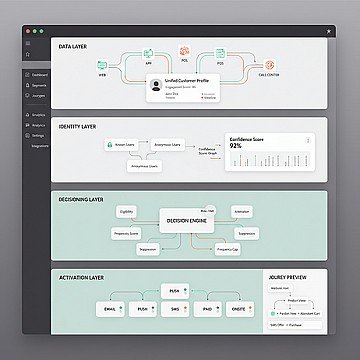
Effective personalization relies on four layers:
- Data layer: Unified customer profiles with identity resolution, event streaming, and consent state
- Decisioning & Orchestration layer: Rules, models, or hybrid logic that determines what to show and when
- Activation layer: Channel connectors that deliver the decision (web, email, SMS, app push, WhatsApp)
- Feedback layer: Event capture that closes the loop and improves future decisions
Artificial intelligence (AI) automates specific tasks within this architecture:
- Segment creation: Predictive audiences based on likelihood to purchase, churn, or engage
- Content generation: Dynamic subject lines, product descriptions, and image selection
- Send-time optimization: Per-user timing based on historical engagement patterns
- Next-best-action: Channel and message selection based on real-time eligibility and propensity
Real-time web personalization requires very fast response times from the decisioning layer. If your stack can’t meet that, use pre-computed segments and cache personalized content at the edge.
If you want to see what low-latency decisioning looks like in the real world, Book a demo and we’ll walk through how to activate it across web, app, and messaging without rebuilding your stack.
Why should you consolidate your stack from a Legacy CDP to Insider One?
Many organizations find themselves in “integration debt” (paying for a legacy CDP to store data, a separate engine to personalize the web, and yet another tool to send emails.) This fragmentation creates data latency and inflates total cost of ownership (TCO).
To drive true efficiency, teams are moving toward a unified System of Growth that combines data management with native activation.
| Feature | Legacy CDP | Insider One (System of Growth) |
| Primary Function | Data Collection: Acts as a passive storage tank for customer data. | Data Activation: Built to turn unified data into real-time cross-channel action. |
| Speed & Latency | Batch Processing: Often suffers from “sync lag,” where data is hours old before it can be used. | Real-Time Decisioning: Sub-millisecond latency for instant web and app personalization. |
| AI Integration | Bolt-on AI: Requires third-party tools or data scientists to export and use models. | Native Sirius AI™: Predictive modeling (likelihood to purchase/churn) is built into the workflow. |
| Channel Reach | Siloed: Requires complex integrations to push data to separate email or SMS tools. | Native Omnichannel: Built-in support for WhatsApp, SMS, App, Web, and Email. |
| Identity Resolution | Basic: Struggles with cross-device stitching for anonymous users. | Advanced: Real-time stitching of anonymous-to-known profiles across the entire journey. |
The bottom line: Consolidating your stack into a single platform doesn’t just save on licensing fees; it eliminates the “data tax” caused by disconnected systems, allowing your team to move from data to revenue in milliseconds rather than days.
Which personalization strategies should you prioritize?
These strategies are sequenced by dependency: data collection comes before segmentation, segmentation before activation, activation before measurement. Teams at different maturity levels can enter at different points, but skipping foundational steps creates fragile personalization that breaks under scale.
How do you collect customer data with explicit consent?
Teams collect behavioral data without mapping consent states, then discover they can’t activate half their audience in regulated channels like email or SMS.
You need to categorize data types and align them with permission levels:
- Zero-party data: Explicitly shared by the customer (preferences, quiz answers, stated interests), requires clear value exchange
- First-party data: Observed behavior on owned properties (page views, purchases, app events), requires cookie/tracking consent where applicable
- Second-party data: Shared from partners, requires contractual and consent alignment
| Consent state | Allowed treatments |
| Full opt-in | All channels, all personalization |
| Partial opt-in (email only) | Email personalization; suppress SMS/push |
| Soft opt-in (transactional only) | Order updates; no promotional content |
| No consent | Anonymous web personalization only |
Let users control frequency, channel, and content category through a preference center. Granular preferences reduce unsubscribes and improve deliverability.
How do you build customer segments and predictive audiences that stay fresh?
When did your segments last refresh? Static segments decay as customer behavior changes. A “high-value” segment built months ago may now include churned users.
| Method | Data requirement | Maintenance | Best for |
| Rules-based | Attributes (e.g., purchase count above a threshold) | Low | Simple, stable criteria |
| RFM scoring | Recency, frequency, monetary value | Medium | Ecommerce lifecycle targeting |
| Clustering | Behavioral features | High | Discovery of unknown segments |
| Predictive | Historical outcomes + ML | Medium | Likelihood to purchase, churn, engage |
Recency, frequency, monetary value (RFM) scoring is a reliable starting point. Score recency (time since last purchase), frequency (order activity in a recent period), and monetary value (total spend) on a simple scale. Combine scores to create segments such as “Champions,” “At-risk,” and “New customers.”
Before activating any segment, check its quality:
- Size: Is it large enough to be actionable?
- Distinctiveness: Does behavior differ meaningfully from other segments?
- Stability: Does membership churn too quickly to activate?
- Accessibility: Can you reach this segment in your activation channels?
How do you personalize web and app experiences in real time?
Real-time web personalization only works if your decisioning layer can return a response before the page renders. If latency is too high, users see a flash of default content before the personalized version loads.
Focus on these on-site modules:
- Hero banner: Dynamic based on segment, referral source, or browse history
- Product recommendations: Personalized carousels (recently viewed, similar items, frequently bought together)
- Social proof: Location-based (“Popular in your area”) or behavior-based (“Customers who viewed this also bought”)
- Exit-intent overlays: Triggered by mouse movement toward browser close
Server-side rendering is fastest but requires backend integration. Client-side rendering is easier to implement but causes flicker. Edge-side rendering at the CDN layer balances speed and flexibility.
Always define a default experience for cases where personalization fails. An empty carousel is worse than a bestsellers fallback.
How do you deploy product recommendations that handle cold start?
Which recommendation algorithm should you use? The answer depends on your catalog size, data volume, and whether you need to recommend to anonymous visitors.
- Collaborative filtering: “Users who bought X also bought Y,” requires purchase history and struggles with new users and new products
- Content-based: “Products similar to what you viewed,” works for new users but requires rich product metadata
- Hybrid: Combines both, offers strong performance, and adds implementation complexity
Cold-start scenarios need explicit fallback logic. For new users with an established catalog, default to bestsellers or trending items until behavior accumulates. For established users with a new product, use content-based similarity to surface new arrivals. For new users with a new product, fall back to editorial curation or category-level popularity.
Over-relying on collaborative filtering creates popularity bias. Failing to exclude out-of-stock items erodes trust. Recommending products the user already purchased (without replenishment logic) feels tone-deaf.
How do you personalize email, SMS, and WhatsApp with modular templates?
Email personalization is limited by client rendering. Open-time content (live inventory, countdown timers) doesn’t work in all email clients, and Apple Mail Privacy Protection inflates open rates, making send-time optimization less reliable.
Use a modular template architecture:
- Static modules: Brand header, footer, legal disclaimers
- Dynamic modules: Product recommendations, personalized copy blocks, location-based offers
- Fallback modules: Default content when personalization data is missing
| Channel | Personalization limit | Compliance note |
| Open-time content unreliable in some clients | CAN-SPAM, GDPR consent required | |
| SMS | Tight character limits | Quiet hours (set by local policy) |
| Template approval required for outbound | Session window limits free-form replies |
For app-installed users, deep-link from email/SMS directly to the relevant product or category in the app. For non-app users, fall back to mobile web. Want proven module patterns and channel-specific guardrails your team can ship fast? Start in the product demo hub and see how omnichannel templates and fallback logic work in practice.
How do you orchestrate cross-channel journeys with frequency caps?
Without frequency caps, a customer who abandons a cart receives an email, an SMS, a push notification, and a WhatsApp message in a short window. That creates a poor customer experience.
Architect, Insider One’s customer journey orchestration solution, manages this through several components:
- Eligibility rules: Who qualifies for this journey? (e.g., cart value above a minimum threshold, not purchased recently)
- Exclusion rules: Who should be excluded? (e.g., already received a promo today, in active support ticket)
- Channel priority: If multiple channels are eligible, which fires first? (e.g., push > email > SMS based on cost)
- Frequency caps: Maximum messages per channel per time period (e.g., limited push and email volume)
Sample arbitration logic:
- Check eligibility: Cart abandoned long enough to be meaningful, cart value above your threshold
- Check exclusion: No recent purchase, no promo sent today
- Apply cap & select channel: If push-enabled and not recently messaged on push, send push. Else, send email.
How do you use conversational commerce for support and sales?
Chatbots are often treated as deflection tools, designed to reduce support tickets. But when connected to customer profiles, conversational commerce becomes a personalization channel.