| Applies to:
PcVue 11.2 onwards |
||
|
|
||
| Summary:
Since PcVue is able to run as a Windows service the use of options in AIExplorer command line becomes very useful. We will describe it in this article. |
||
|
|
||
| Details:
When running PcVue as a service, this becomes a little more complicated with two additional components:
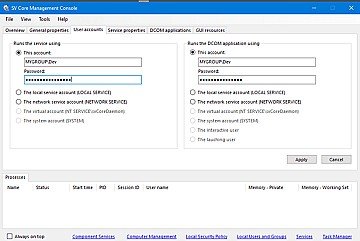
After selecting the user accounts in the console’s User accounts tab, open the Windows component services configuration dialog box. A shortcut is available in the Tools menu of the SV Core Management Console. It is used to configure DCOM for the SV Services service, which cannot be done directly via the SV Core Management Console. Expand the tree in the left-hand panel and select the DCOM Config node. Locate the SV Services object in the middle panel and right-click to select properties. Select the Security tab and check Customize in Execution and activation permissions. Add the previously selected user. For this user, add only Local Execution and Local Activation. To open Application Explorer or Application Architect, do the same for the Windows session user concerned. Repeat these steps for access authorizations. Close the Component Services Configuration dialog box and restart Windows. Now you are able to start Application Explorer from Windows menu. But you need to have the right in term of user privilege and in term of licence. But even with a runtime licence you should be able to open the user management part of the Application Explorer, if your account have the necessary priviledges. To open a specific part of the Application Explorer, first you need to send a shorcut of it to the desktop and edit it to add an option: In this case the option UserRights to open PcVue User accounts part of Application Explorer. Of course it is possible to use other options like Exports, OPC, BACnet, Variables, Archives, Events, Cyclics, Networking, Servers… |
||
|
|
||
|
Created on: 31 Jan 2024 Last update: 30 May 2024