Summary
Personalized email marketing uses customer data and real-time behavior to deliver more relevant content, recommendations, and offers that consistently outperform batch campaigns. The most effective strategies combine first-party data, AI-powered personalization, and automated triggers like welcome, cart abandonment, and browse recovery emails while balancing relevance with frequency to maximize engagement and revenue.
Most marketing teams know personalized emails work better than batch campaigns. Execution still lags behind intent. The challenge now is the operational reality of unifying fragmented data, building segments that actually reflect behavior, and triggering messages that feel timely instead of intrusive.
Teams that close this gap often improve open rates, click-through rates, and customer lifetime value because personalized emails reduce friction between intent and action.
What are personalized emails?
Many teams think adding a first name to a subject line counts as personalization. On its own, that tactic is too limited to serve as a full strategy.
Personalized emails adapt content, timing, or offers based on what the platform knows about each recipient. This ranges from simple merge fields to AI-driven product recommendations that change for every user.
Several levels define how deep personalization can go:
- Token-based: Individual fields inserted via merge tags, like “Hi {{first_name}}” with a fallback to “Hi there”
- Segment-based: The entire message or offer varies by audience, so VIP customers see early access while new subscribers see a welcome discount
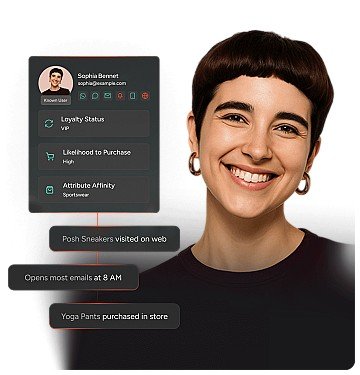
- Dynamic/behavioral: Content blocks, timing, or channel selected per user in real time, such as a browse abandonment email showing the exact product someone viewed
Segmentation groups people. Personalization tailors the message. Automation triggers the send. All three work together, but conflating them leads to shallow execution that doesn’t move the needle.
Why do personalized emails drive measurable revenue?
Relevance reduces friction. When the subject line reflects what someone browsed, or the offer matches their purchase history, the cognitive load to act drops. That’s why personalized campaigns often improve open rate, click-through rate, conversion rate, and revenue per recipient.
Higher open and click-through rates
Relevance in the subject line and preview text earns the open. Relevance in the body earns the click.
Personalized subject lines signal “this is for you,” cutting through inbox noise. Dynamic content blocks sustain attention once opened. Showing the product category someone browsed, rather than a generic hero image, keeps them engaged.
Improved conversion rates and average order value
Personalized product recommendations compress the path from click to checkout. When the email surfaces items the user already considered, or complementary products, conversion rates rise and basket size increases.
Cross-sell and upsell logic work here. A post-purchase email recommending accessories for what someone just bought capitalizes on purchase momentum.
Stronger retention and lifetime value
Lifecycle emails keep customers engaged beyond the first purchase. Welcome series, replenishment reminders, and milestone messages all fall into this category.
Personalization here means timing the message to the individual’s usage pattern, not a fixed calendar. Each relevant touchpoint increases the likelihood of the next purchase. The effect compounds over time.
How do personalized emails lower acquisition cost and reduce send waste?
Sending fewer, more relevant emails to the right segments reduces unsubscribes and spam complaints. This protects deliverability and concentrates budget on high-intent recipients.
Suppression logic is a form of personalization that improves efficiency. Excluding recent purchasers from discount campaigns, for example, protects margins while respecting the customer’s context. If you want to see what this looks like when data, triggers, and templates work together, book a demo and we’ll walk through a real personalization workflow end to end.
How do personalized emails work across data, channels, and AI?
Teams often start personalizing before their data is clean or unified. This leads to embarrassing errors: wrong names, outdated preferences. These mistakes erode trust faster than generic emails do.
Step 1: Collect consented first-party data.
Personalization quality is capped by data quality. You need the following types:
- Profile attributes: Name, location, language, birthday
- Behavioral events: Page views, product views, add-to-cart, purchases
- Preference signals: Quiz answers, preference center selections, email engagement history
A sound first-party data strategy means if the user hasn’t opted in or provided the data, you don’t use it. Progressive profiling, asking for one piece of information at a time, builds richer profiles without friction.
Step 2: Build audience segments.
Segments are the foundation for personalization logic. They can be static or dynamic based on behavior.
- Value-based: VIP customers by lifetime value, or at-risk users with no recent purchase
- Behavioral: Browsed a specific category recently, abandoned cart, opened several recent emails
- Lifecycle: New subscriber, first-time buyer, repeat purchaser
More granular segments enable more relevant messages but increase operational complexity. Teams with limited resources should start with a small set of high-impact segments before expanding.
Step 3: Select the next best channel.
Email isn’t always the right channel for a given message. If the user engages more on push or WhatsApp, the journey should route there.
This step applies primarily to teams with orchestration capabilities. Email-only teams can skip it but should note the limitation.
Step 4: Personalize content and send time.
Key dimensions matter here:
- Content personalization: Merge tags with fallbacks, dynamic content blocks showing different images or offers based on segment, and product recommendations selected by AI based on browse and purchase history
- Send-time optimization: Delivering at the time each recipient is most likely to engage, based on historical open patterns
Always set a fallback like “there” or “friend” in case the name field is empty. If a merge tag is empty, the email should render gracefully. It should never display “Hi {{first_name}}.”
If you want a fast way to evaluate what’s possible with your current data and channels, explore the product demo hub and see personalization patterns you can apply in your program.
Step 5: Trigger journeys in real-time.
The most effective personalized emails rely on event-triggered workflows, not batch scheduling.
- Browse abandonment: Triggered when a user views a product but doesn’t add to cart within a defined window
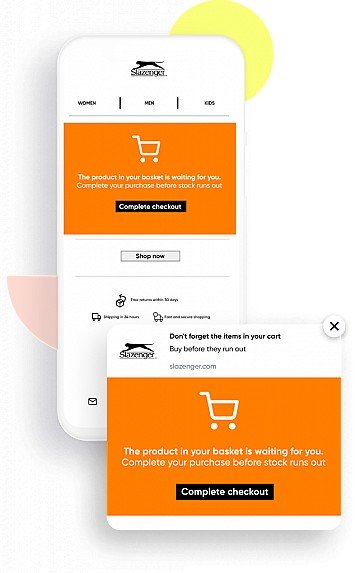
- Cart abandonment: Triggered when items are added but checkout isn’t completed
- Post-purchase: Triggered after order confirmation to cross-sell, request a review, or start a replenishment countdown
Trigger timing matters. A cart abandonment email sent soon after abandonment typically outperforms one sent much later for most verticals. The optimal window varies by product consideration level.
Step 6: Measure and iterate with holdout tests.
Measuring personalization impact requires a holdout group: a small percentage of the audience that receives the non-personalized version. Without a holdout, you can’t isolate the lift from personalization versus other factors.
- Holdout design: Typically a small percentage of the audience, randomly assigned
- Metrics to compare: Open rate, click-through rate, conversion rate, revenue per recipient
- Iteration cadence: Review results regularly and sunset underperforming personalization logic
Running A/B tests on subject lines while ignoring holdouts on content personalization misses half the picture. If you want help setting up holdouts that prove real incremental lift (not vanity gains), book a demo and we’ll map a measurement plan to your journeys.
What personalized email strategies scale best?
The strategies below are ordered by implementation complexity. Teams with basic email service providers (ESPs) and limited data should start with the first few. Teams with unified customer profiles and journey orchestration can layer in the rest.
How should you segment audiences by behavior and customer value?
Demographic segmentation is a starting point, but behavioral and value-based segments drive higher lift.
- High-intent browsers: Viewed product detail pages multiple times without purchasing
- Lapsed VIPs: Top-tier customers with no purchase in a while
- Discount-sensitive versus full-price buyers: Tailor offer strategy accordingly
If a segment is too small, results become statistically unreliable and operational overhead increases.
How do dynamic content blocks work across templates?
Dynamic content blocks allow a single email template to render differently based on recipient attributes or segment membership.
- Hero image: Show the category the user browsed most recently
- Offer block: Show loyalty points balance for members, generic call-to-action for non-members
- Product grid: Populate with AI-recommended items
Dynamic blocks require more quality assurance testing but reduce the number of templates to maintain.
How should you personalize subject lines and sender names?
Subject line personalization goes beyond inserting a name.
- Behavior reference: “Still thinking about the [product category]?”
- Urgency with context: “Your cart expires soon”
- Sender name variation: Using a personal name like “Sarah from [Brand]” can lift opens in some verticals but feels off-brand in others
If every email has the recipient’s name in the subject line, it loses impact. It can feel formulaic. If you want examples of subject-line and sender strategies that don’t read like automation, browse the product demo hub and use what fits your brand.
How do triggered lifecycle emails work?
Lifecycle emails often deliver strong ROI for many brands.
- Welcome series: A short series of emails introducing the brand, collecting preferences, offering a first-purchase incentive
- Post-purchase: Order confirmation, shipping updates, review request, cross-sell
- Replenishment: Timed to product usage cycle, shorter for some categories and longer for others
- Milestone: Birthday, anniversary, loyalty tier upgrade
Lifecycle emails should be evergreen and optimized regularly, not rebuilt from scratch.
How can you recover abandoned carts and forms?
Cart abandonment is the most common entry point for triggered personalization.
- Initial email (soon after abandonment): Reminder with product image, no discount
- Follow-up email (later): Social proof or urgency like “limited stock”
- Final email (after additional time): Incentive if margin allows
Form abandonment follows similar logic but requires sensitivity to context. Financial forms warrant a softer touch than shopping carts.
How should you re-engage dormant subscribers?
Dormant subscribers, those with no open or click in a long time, drag down deliverability and inflate list costs. A re-engagement campaign gives them a reason to stay or a graceful exit.
- Initial email: “We miss you” with a compelling offer or content roundup
- Follow-up email: “Last chance” with clear unsubscribe option
- Suppression: If no engagement after the series, suppress from regular sends
Aggressive win-back discounts can train customers to disengage intentionally.
How do predictive product recommendations work?
AI-powered recommendations analyze browse and purchase history to surface products each recipient is most likely to buy.
- Cross-sell: “Customers who bought X also bought Y”
- Replenishment prediction: “Time to reorder?” based on typical repurchase interval
- New arrivals: Filtered to categories the user has shown interest in
Predictive recommendations require sufficient behavioral data. For new subscribers, fall back to bestsellers or editorially curated picks.
How should you optimize send time for each recipient?
Send-time optimization uses historical engagement data to deliver emails when each recipient is most likely to open. Enable it, then review aggregate performance regularly.
For time-sensitive campaigns like flash sales ending at midnight, a fixed send time aligned to the deadline is more appropriate than individualized timing.
What do real-world personalized email examples look like by use case?
These examples are organized by use case because the underlying logic transfers across industries.
Welcome email with preference capture: Triggered by new subscriber signup. Uses first name in greeting, preference center link, and content tailored to signup source. Sets expectations, collects zero-party data, and delivers value immediately.
Browse abandonment with product spotlight: Triggered when someone views a product detail page but doesn’t add to cart within a short window. Shows the product image and name, “still available” messaging, and related items. Re-engages high-intent users with the exact item they considered.
Cart abandonment sequence: Triggered when items are added but checkout isn’t completed within a short window. Shows cart contents with images and prices, dynamic urgency, and an optional incentive in email three. Addresses different objections across the sequence.
Post-purchase cross-sell: Triggered when an order is confirmed. Shows “complete the look” or “pairs well with” recommendations based on the purchased item. Capitalizes on purchase momentum while the brand is top of mind.
Replenishment reminder: