Marketing automation campaigns run continuously in the background, recovering abandoned carts, re-engaging dormant users, and driving repeat purchases while your team focuses on strategy. When built correctly, they compound returns over time. When built poorly, they erode trust through message fatigue, broken personalization, or compliance failures that damage sender reputation.
This guide walks through the campaign types that drive the most revenue, the infrastructure required to run them reliably, and the measurement frameworks that separate real lift from vanity metrics. You’ll also see how Insider One’s native customer data platform (CDP), artificial intelligence (AI)-powered orchestration, and cross-channel execution eliminate the need to stitch together separate tools.
What should you know at a glance?
A marketing automation campaign is a triggered, multi-step sequence that sends the right message to the right segment at the right time, without manual intervention.
- Campaign types that drive the most revenue include:
- Welcome
- Cart abandonment
- Re-engagement
- Product recommendations
- Birthday
- Price-drop alerts
- Post-purchase
- Retargeting sync
- Success depends on data quality, suppression logic, and holdout-based measurement, not just the tool you choose
- Ready to evaluate platforms? Skip to how Insider One powers these campaigns
What is a marketing automation campaign?
A marketing automation campaign is a triggered sequence of messages, governed by entry rules, branching logic, and exit criteria, that executes without manual intervention once activated. This means you set it up once, and it runs continuously whenever someone meets your criteria.
Most teams conflate a few related concepts:
- Segment: A static or dynamic audience definition that determines who qualifies
- Workflow: The logic and branching rules that determine what happens
- Campaign: The activated combination of segment, workflow, channels, and goal running live against real users
The anatomy follows a strict flow: Trigger → Segment Filter → Sequence (with branches) → Exit/Goal. Triggers can be behavioral (cart abandonment), time-based (birthday), or event-driven (price drop). Campaigns span channels:
- SMS
- Push
- Paid media retargeting
Why marketing automation campaigns drive ROI.
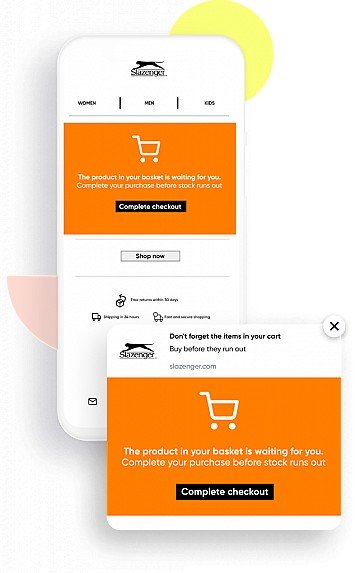
A cart abandonment campaign recovers revenue while your team sleeps, which is critical given that nearly 70% of online carts are abandoned according to Baymard Institute’s meta-analysis. A manual email blast requires scheduling, list pulls, and QA every time. The ROI case for automation is not about doing more. It’s about compounding returns from sequences that run continuously.
| Campaign type | Primary KPI | Secondary KPI |
| Welcome/onboarding | Activation rate | Time-to-first-purchase |
| Cart abandonment | Revenue recovered | Recovery rate |
| Re-engagement | Reactivation rate | List hygiene improvement |
| Price-drop/back-in-stock | Return visit rate | Conversion rate |
Automation has failure modes too:
- Over-automation: Sending too many messages without frequency caps erodes trust
- Under-measurement: Running campaigns without holdouts makes ROI claims unfalsifiable
- Data debt: Campaigns built on stale or incomplete data fail silently
How to set up marketing automation campaigns.
Campaigns fail when teams skip entry/exit logic, ignore suppression, or launch without QA. Here’s a framework that addresses each.
How do you define the trigger and entry criteria?
The trigger is the event that starts the campaign. Entry criteria filter who qualifies. A trigger without entry filters floods users with irrelevant messages.
IF event = cart_abandoned
AND cart_value > threshold
AND user NOT IN (active_cart_campaign, recent_purchase_window)
THEN enroll
How do you build the sequence with branching logic?
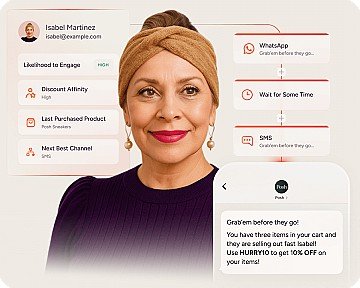
A sequence is not a linear drip. Effective campaigns branch based on user response: opened email → wait → send SMS; did not open → wait → send push.
More branches increase relevance but also increase QA burden. Start with a simple branch structure (engaged vs. not engaged) before adding complexity.
How do you set exit criteria and frequency caps?
Exit criteria define when a user leaves the campaign: converted, unsubscribed, or reached max touches. Frequency caps prevent message fatigue across campaigns.
Teams often set exit criteria for the goal (purchased) but forget to suppress users already in a higher-priority campaign. A useful hierarchy: transactional > triggered behavioral > lifecycle > promotional. Frequency caps should be global, not just per-campaign.
How do you orchestrate across campaigns to prevent collisions?
Without orchestration, a customer receives a “We miss you” re-engagement email and a “Thanks for your order” transactional email on the same day.
Define a priority hierarchy:
- Transactional (order confirmation, shipping)
- Triggered behavioral (cart abandonment, browse abandonment)
- Lifecycle (welcome, milestone)
- Promotional (sale, newsletter)
If a user enters a cart abandonment campaign, suppress them from promotional campaigns for a cooling-off period. This requires a platform with global orchestration, not just per-campaign logic.
How do you QA before launch?
A broken dynamic block or missing suppression rule can damage deliverability and brand trust. Before launching:
- Test with seed users across all branches
- Verify dynamic content renders correctly (product images, prices, names)
- Confirm suppression rules fire as expected
- Check send times against user time zones
- Validate exit criteria by simulating goal completion
How do you monitor and iterate?
A cart abandonment campaign that performed well in the past may now underperform due to changed user behavior or competitive offers. Review high-volume campaigns regularly and lifecycle campaigns on a slower cadence.
Which marketing automation campaign examples drive results?
Each campaign type below follows a consistent structure: trigger, sequence, exit criteria, and KPIs.
What do welcome and onboarding campaigns look like?
- Trigger: signup_completed or first_login
- Sequence: Initial welcome email with value prop, follow-up product education, later social proof or incentive
- Exit criteria: User completes activation milestone (first purchase, profile completion)
- KPIs: Activation rate, time-to-first-value
For ecommerce, “activation” is first purchase. For software as a service (SaaS), it’s feature adoption. Use early messages for progressive profiling to collect zero-party data that informs later personalization.
What do abandoned cart recovery campaigns look like?
- Trigger: cart_abandoned AND cart_value > threshold
- Sequence: Shortly after, send an email reminder with no discount, later send an email with urgency, later send SMS or push with a small incentive, final sync to paid retargeting and suppress from further messages
- Exit criteria: Purchased OR reached max touches OR unsubscribed
- KPIs: Recovery rate, revenue recovered, AOV of recovered carts
Avoid offering a discount in the first message. This trains users to abandon carts for deals. Email-only recovery misses users who prefer SMS or push. Retargeting users who already purchased wastes ad spend.
Browse abandonment is a related but distinct campaign, triggered by product view without add-to-cart.
What do re-engagement and win-back campaigns look like?
- Trigger: last_activity exceeds an inactivity threshold (which varies by industry)
- Sequence: Initial “We’ve missed you” message with personalized recommendations, later send a value reminder, final send a last offer or opt-down prompt
- Exit criteria: Re-engaged OR opted down OR reached max touches
- KPIs: Reactivation rate, list hygiene improvement, revenue from reactivated users
Users who do not re-engage after the final touch should be suppressed from promotional campaigns. ISPs penalize senders who continue mailing unengaged users. If you want to see what this looks like in a real, cross-channel journey (with suppression and frequency caps built in), book a demo and we’ll walk through a win-back flow end to end.
What do behavioral product recommendation campaigns look like?
- Trigger: browse_product OR add_to_wishlist OR purchase_completed
- Sequence: Soon after, send an email with personalized recommendations, later send push or SMS with complementary products
- Exit criteria: Purchased recommended item OR reached max touches
- KPIs: Recommendation click-through rate, AOV uplift, conversion rate
Recommendations require a product catalog feed with attributes (category, price, availability) and behavioral data (views, purchases). Recommending out-of-stock items because the catalog feed is stale is a fast way to lose trust.
What do birthday and milestone campaigns look like?
- Trigger: birthday_date = today OR anniversary_date = today OR loyalty_tier_upgrade = true
- Sequence: On the date (celebratory message with exclusive offer)
- Exit criteria: Offer redeemed OR expiration date passed
- KPIs: Redemption rate, AOV of milestone purchases
Birthday campaigns require a birthdate field, which should be captured through progressive profiling rather than required at signup. Send based on the user’s local time zone.
What do price-drop and back-in-stock alerts look like?
- Trigger: price_dropped beyond a defined threshold on wishlisted item OR inventory_available = true
- Sequence: Immediate (email or push with product link and urgency)
- Exit criteria: Purchased OR item out of stock again
- KPIs: Alert-to-purchase conversion rate, return visit rate
These campaigns require real-time catalog sync. If the feed updates infrequently, users receive alerts for items that are already sold out. For high-demand products, updates should be as close to real-time as possible. Browse real examples in the product demo hub to see how real-time triggers and catalog updates come together.
What do post-purchase and transactional upsell campaigns look like?
- Trigger: order_confirmed OR shipment_dispatched
- Sequence: Immediate (order confirmation), later (cross-sell complementary products), later (review request or loyalty prompt)
- Exit criteria: Purchased cross-sell item OR reached max touches
- KPIs: Cross-sell conversion rate, review submission rate, repeat purchase rate
Transactional messages are exempt from marketing opt-in requirements in most jurisdictions, but upsell content within those messages may not be. Keep transactional content primary, with upsell content clearly secondary.
How does advertising retargeting audience sync work?
- Trigger: Segment membership change (added to cart_abandoners, removed from recent_purchasers)
- Sequence: Real-time or batch sync to ad platform (Meta, Google, TikTok)
- Exit criteria: User converts OR exits segment
- KPIs: Retargeting ROAS, cost per acquisition, suppression accuracy
This is an automated audience export, not a message campaign. Retargeting users who already converted because the suppression sync is delayed wastes ad spend. For cart abandonment, frequent or real-time sync is ideal.
Audience sync requires user consent for advertising purposes in GDPR/CCPA jurisdictions.
What data and infrastructure do you need for marketing automation?
A cart abandonment campaign that never fires because the cart_abandoned event is not being tracked. A birthday campaign that sends to users with invalid birthdates. These failures are silent.
| Campaign type | Required events | Required properties |
| Cart abandonment | cart_abandoned, purchase_completed | cart_value, product_ids, user_id |
| Welcome | signup_completed | email, signup_source |
| Price-drop | price_changed | product_id, old_price, new_price |
| Back-in-stock | inventory_updated | product_id, availability |
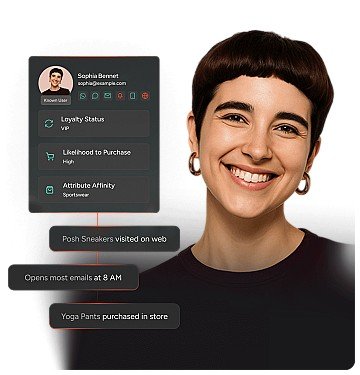
Campaigns that span channels (email, SMS, push) require a unified user profile. If a user signs up on web and later logs in on mobile, both sessions must resolve to the same profile. Without identity resolution, the same user receives duplicate messages or is excluded incorrectly.
Latency targets vary by campaign type:
- Real-time triggers (cart abandonment, back-in-stock): Near-real-time event delivery
- Batch triggers (birthday, re-engagement): Batch sync is sufficient
- Audience sync to ads: Frequent sync for behavioral segments, less frequent sync for lifecycle
If you’re not sure whether your current stack can meet those latency and identity requirements without manual workarounds, book a demo and we’ll map your key triggers and data flows in minutes.